Month 4 Journal
- DB, SQL, NoSQL vs Relational:
- Databases (DB) are structured collections of data that are used to store, retrieve, and manage information efficiently.
- SQL Databases are relational databases that use Structured Query Language (SQL) for defining and manipulating data. Examples include MySQL and PostgreSQL.
- NoSQL Databases are non-relational databases designed to handle a variety of data models, including key-value, document, columnar, and graph formats. Examples include MongoDB and Redis.
- Relational Databases store data in tables with rows and columns, and data is accessed through relations between these tables.
- Deploy/Manage:
- The process of installing, configuring, and maintaining database management systems such as MySQL, MariaDB, and PostgreSQL. These tasks include setting up the database, ensuring high availability, performing backups, and monitoring performance.
- Scaling (V-H):
- Vertical Scaling involves adding more resources (CPU, RAM) to a single server to handle more load.
- Horizontal Scaling involves adding more servers or instances to distribute the load across multiple nodes, enhancing capacity and redundancy.
- Mongo, Redis:
- MongoDB: A NoSQL document-oriented database known for its high performance, high availability, and easy scalability.
- Redis: An open-source, in-memory data structure store, which can be used as a database, cache, and message broker. It supports various data structures like strings, hashes, lists, sets, and more.
- Relational Database ID’s:
- Unique identifiers known as IDs are used in relational databases to distinguish each record within a table, allowing for efficient data retrieval and relationship mapping.
- Browser Tool, Check Cache:
- Browser Developer Tools: Accessible via pressing
F12or right-clicking and selecting “Inspect.” These tools allow you to debug frontend code, view network activity, manage cookies, and inspect the DOM. - Check Browser Cache: Examine stored information, particularly looking at extra tables within the browser’s local storage or cache to troubleshoot performance issues or verify data storage.
- Browser Developer Tools: Accessible via pressing
- tcpdump, Logfiles:
- tcpdump: A network packet analyzer that captures and displays the packets that a computer receives or transmits. It’s used for network troubleshooting.
- Logfiles: Files that store a sequential record of events and activities for a system, application, or network. They are essential for diagnosing issues and tracking traffic.
- Client-Side vs Server-Side Cache:
- Client-Side Cache: Stored in the user’s browser, facilitating faster data retrieval by loading resources locally.
- Server-Side Cache: Managed by the server (e.g., nginx or Redis), which stores computational results and static assets to reduce load times and server processing.
- Cache Management:
- Involves techniques for handling and updating cache data, including managing stale data (outdated cache), setting cache headers for specifying expiration times, and using cache control flags to control caching behavior.
- Cache Examples:
- wp-admin Not Cached: Administrative pages in WordPress (
wp-admin) are typically not cached to ensure up-to-date data for management activities. - wp-content Cached: Content pages and resources (
wp-content) are usually cached to speed up delivery to users.
- wp-admin Not Cached: Administrative pages in WordPress (
- Redis Cluster:
- Redis can be configured in a cluster setup for distributing data across multiple nodes, ensuring high availability and scalability. For example, Reddit uses master-slave configurations where reads are load-balanced across replicas, while writes are handled by the primary node.
- Read Replica Concept:
- Involves creating copies of a database (read replicas) to distribute read traffic, thus reducing the load on the primary database server and enhancing read performance.
- RAID, Sharding, LRU Concepts:
- RAID (Redundant Array of Independent Disks): Combined multiple disks to improve redundancy and performance, e.g., RAID 5 provides data striping with parity.
- Sharding: Splitting a database into smaller, more manageable pieces, or shards, to improve performance and enable horizontal scaling.
- LRU (Least Recently Used): A caching algorithm that evicts the least recently accessed items first to make room for new data.
- Netflix Engineering Blog:
- A source of valuable information on best practices, lessons learned, and innovative solutions that Netflix has implemented in its data engineering and technology stack.
- Managed Databases:
- Services like Amazon RDS allow users to run databases in the cloud without managing the underlying hardware, offering benefits in terms of maintenance and scalability. Cost comparisons often consider on-premises solutions versus fully managed services.
- Database Tools:
- phpMyAdmin, WebAdminer: Web-based tools for managing MySQL and other databases.
- MySQL Workbench: A unified tool for database architects, developers, and DBAs.
- Navicat: A database management tool that supports multiple database systems.
- Securing DB Connection:
- Ensuring that database connections are protected through encryption protocols like SSL/TLS to prevent unauthorized access and data breaches.
- PostgreSQL vs Aurora:
- PostgreSQL: An open-source, object-relational database system known for its robustness and feature set.
- Amazon Aurora: A managed database service compatible with MySQL and PostgreSQL, offering enhanced performance and reliability.
- Indexing Concepts:
- Techniques like B-trees, hash indexes, and more are used to optimize database queries by improving the speed at which data is retrieved.
- DevOps Database Knowledge:
- DevOps engineers should understand database deployment, scaling, management, monitoring, and optimization to efficiently integrate databases into CI/CD pipelines.
- MySQL Cluster, Load Balancer:
- MySQL clustering and load balancing techniques are used to improve performance and ensure high availability by distributing database queries across multiple servers.
- Assignment Structure:
- Describes a typical setup involving:
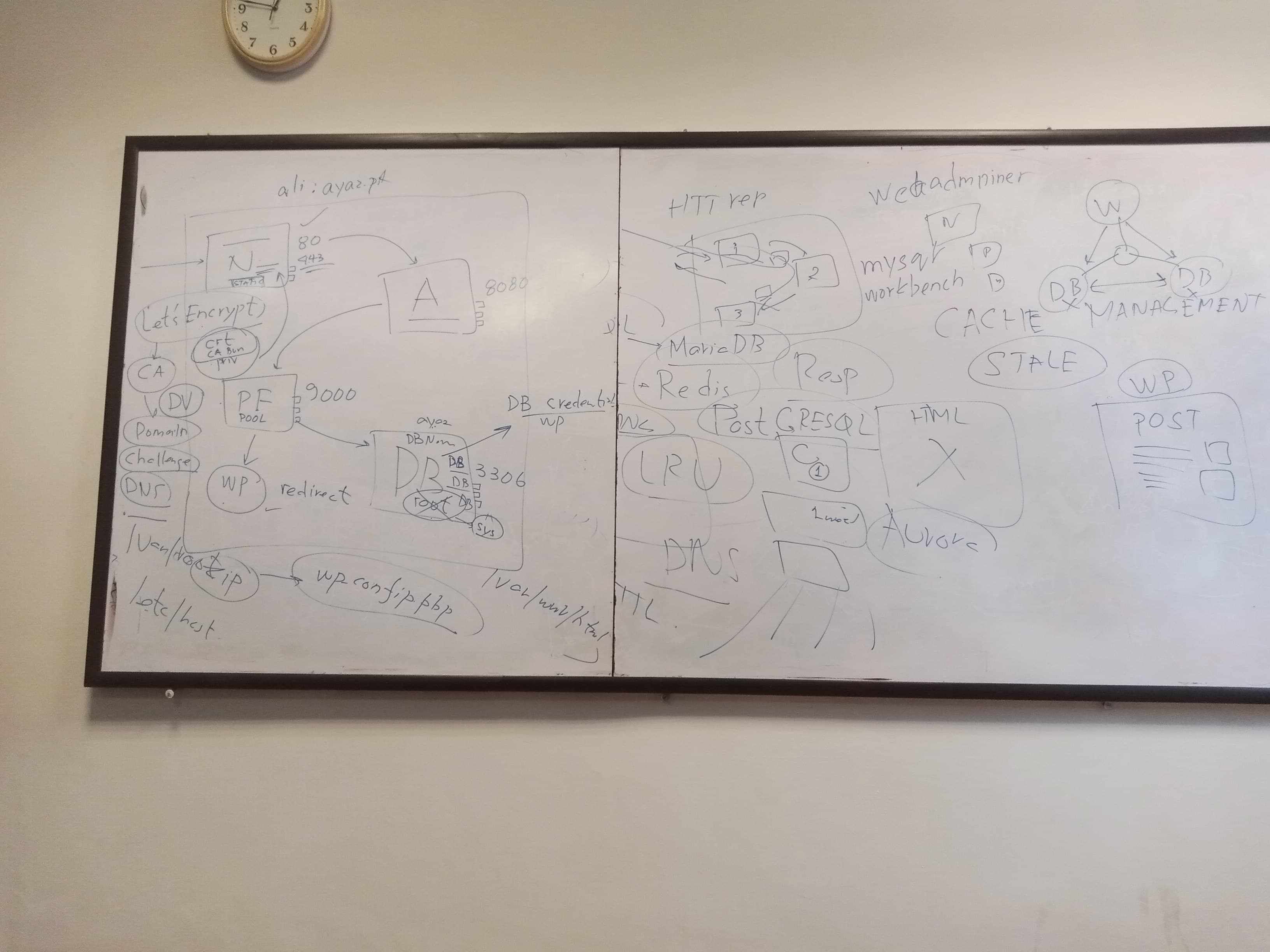
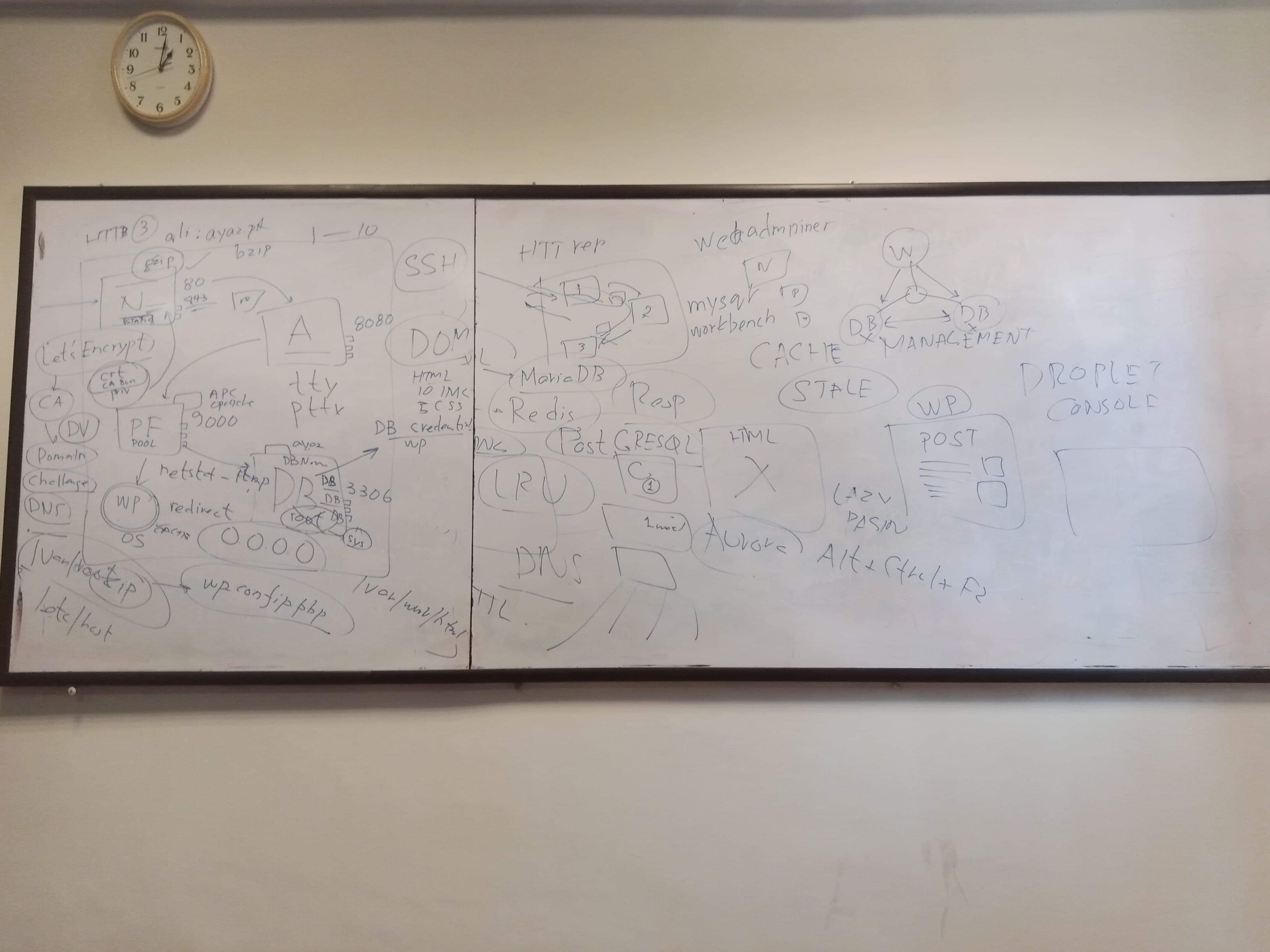
- nginx: Handles incoming traffic on ports 80 and 443, forwarding it to port 8080.
- apache: Listens on port 8080, processing requests and sending them to PHP-FPM on port 9000.
- php-fpm: Processes PHP requests and interacts with the database on port 3306.
- Database Security: Configuring root and non-root database credentials securely in
wp-config.php. - Static Content: Direct nginx configuration to serve static content directly for enhanced performance.
- Let’s Encrypt SSL: Use Let’s Encrypt to obtain SSL certificates, which involves validation through a challenge process.
- Describes a typical setup involving:
- DB Layer Cache:
- Implement caching at the database layer to reduce read latency and improve performance.
- PHP-fpm, Cache:
- Use PHP-FPM (FastCGI Process Manager) with caching mechanisms like Redis to speed up PHP processing.
- Lazy Loading, Pagination:
- Techniques for loading data as needed (lazy loading) and splitting large datasets into pages (pagination) to improve user experience and performance.
- DOM, Image:
- Efficiently managing and optimizing the Document Object Model (DOM) and images to enhance webpage loading times and performance.
- WP Plugins vs Gzip Compression:
- Use of WordPress plugins to extend functionality, and gzip compression to reduce the size of files sent from the server to the client, speeding up website performance.
- CORS Issue, Mixed Content, SSL - HTTP issues:
- Handling issues related to Cross-Origin Resource Sharing (CORS), mixed content (http and https), and securing HTTP connections with SSL to protect data integrity and privacy.
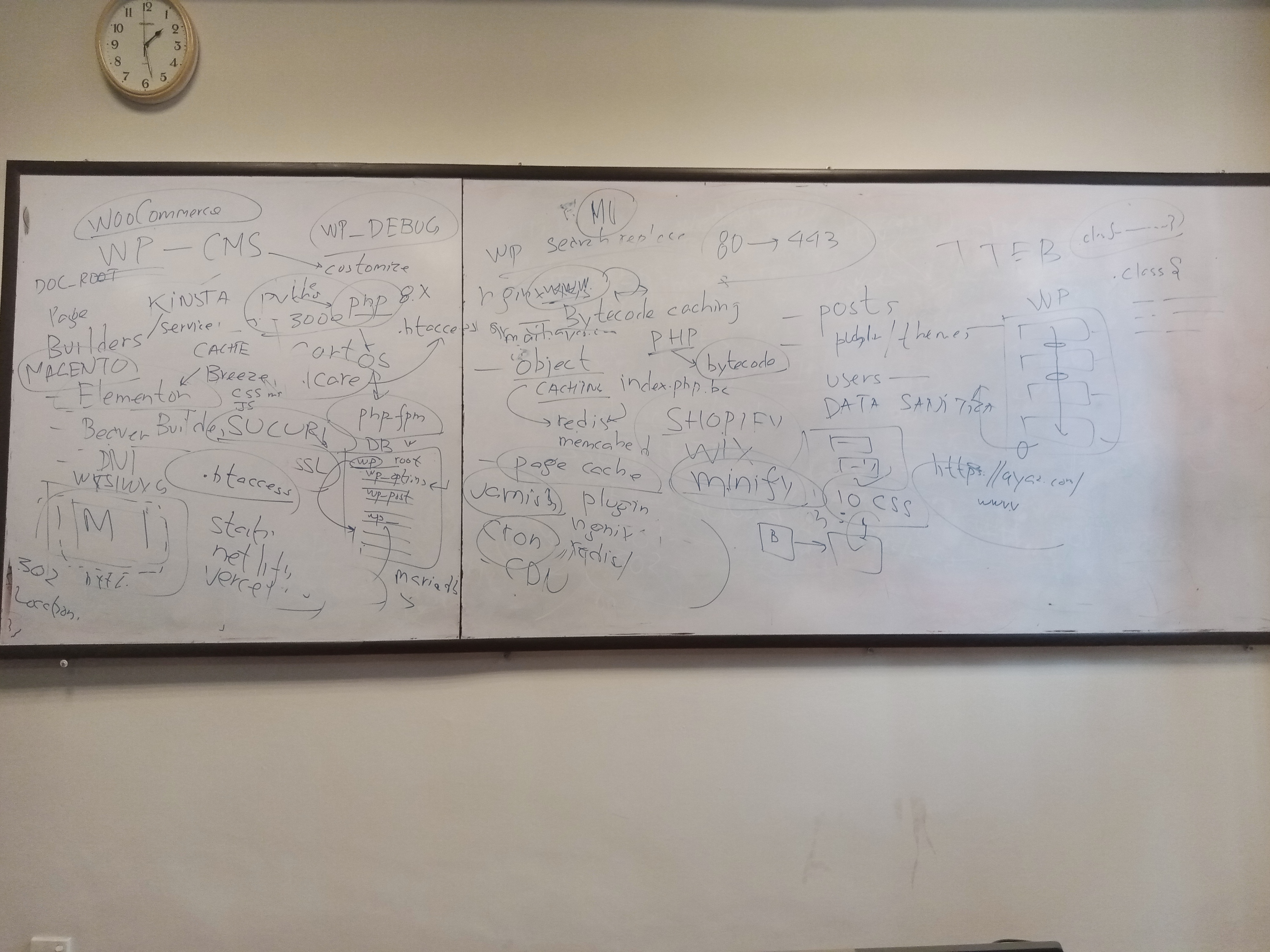
- WordPress (WP) - CMS:
- WordPress.org: A stable, customizable content management system (CMS).
- Ensure PHP and PHP-FPM versions are compatible.
- WP-Debug:
- Enable debugging in WordPress by setting the
WP_DEBUGflag to true inwp-config.phpto identify and troubleshoot errors.
- Enable debugging in WordPress by setting the
- WordPress Structure:
- Familiarization with the directory structure:
- wp-content: Contains the plugins, themes, and uploads.
- wp-admin: The backend administration interface.
- wp-includes: Core WordPress files.
- Familiarization with the directory structure:
- Secure Plugins:
- Verify the legitimacy of themes and plugins to avoid using nulled or pirated versions, which might pose security risks.
- WP-CLI:
- Command-Line Interface for WordPress allowing you to manage WordPress sites from the terminal.
- WP Search and Replace:
- Tool to update site URLs from HTTP to HTTPS across the database.
- REST API:
- WordPress REST API allows external applications to interact with WordPress content securely.
- Hooks:
- Actions and filters in WordPress that allow developers to extend and modify the core functionalities and behaviors.
- Multisite WordPress:
- A feature of WordPress that allows you to manage multiple sites from a single WordPress installation.
- WooCommerce:
- An open-source e-commerce plugin for WordPress, enabling users to set up and run online stores.
- Malcare:
- A WordPress security service providing malware detection and removal.
- SQL Injection, Data Sanitization:
- Protecting against SQL injection attacks by sanitizing inputs to ensure only valid data is processed.
- API Concept:
- Understanding and implementing secure and efficient API interactions between clients and servers.
- Headless CMS:
- CMS architecture where the frontend and backend are decoupled, allowing for greater flexibility in how content is delivered across different platforms.
- Bytecode Caching, PHP, Object Caching:
- Techniques like bytecode caching (pre-compiled PHP code) and object caching (storing frequently accessed data) for performance improvements using tools like Redis and Memcached.
- Page Cache:
- Storing entire web pages in cache to reduce server load and improve loading times. This can be achieved through plugins, nginx configurations, or Redis.
- CDN Level:
- Utilizing a Content Delivery Network to distribute web content geographically closer to users, improving load times and reducing latency.
- Builders Concept:
- Tools like Beaver Builder and Divi are drag-and-drop page builders for WordPress that enable users to design and customize websites without coding.
- Sucuri Script:
- A script provided by Sucuri Security to protect websites from malware and potential threats.
- WWW Concepts, Redirects, TTFB:
- Handling URL redirects from non-www to www versions and optimizing Time To First Byte (TTFB) to improve site speed and performance.
- Minify CSS, JS Scripts:
- Reducing the file size of CSS and JavaScript files to improve website performance by removing unnecessary characters without affecting functionality.
- Varnish Caching:
- Using Varnish as a caching solution to improve web application performance by storing cached copies of files and dynamically-generated content.
- Database Queries, DB 3306:
- Database Queries: Commands used to interact with a database, such as SELECT, INSERT, UPDATE, and DELETE.
- DB Port 3306: The default port number for MySQL database connections.
- SSH Tunneling, Access MySQL Workbench over SSH:
- SSH Tunneling: A method of creating a secure connection between a local and a remote computer by forwarding ports through SSH.
- Use SSH tunneling to securely access MySQL Workbench on a remote server via an SSH connection.
- SSH IP Tunneling, MySQL Localhost:
- SSH IP tunneling allows you to connect to a remote MySQL database as if it were running on your local machine (
localhost), enhancing security by encrypting the connection.
- SSH IP tunneling allows you to connect to a remote MySQL database as if it were running on your local machine (
- Botnet, Scan 22:
- Botnet: A network of compromised computers controlled remotely by an attacker, often used to perform malicious activities like DDoS attacks.
- Scan 22: Refers to scanning for open SSH ports (Port 22) which can be targeted by botnets for brute-force attacks.
- fail2ban:
- A security tool that monitors log files and bans IP addresses exhibiting malicious behavior, such as repeated failed login attempts, to protect against brute-force attacks.
- netstat:
- A network utility that displays network connections, routing tables, interface statistics, masquerade connections, and multicast memberships. Useful for diagnosing network issues.
- Permalinks, URLs, Query Parameters:
- Permalinks: Permanent URLs to your individual blog posts, categories, and other archive pages.
- URLs: Uniform Resource Locators used to specify addresses on the web.
- Query Parameters: Parts of a URL that assign values to specified parameters, used to pass data to web applications.
- SLUG, SEO Friendly:
- SLUG: The URL-friendly version of a post title, typically all lowercase and containing only letters, numbers, and hyphens.
- SEO Friendly: URLs and other elements optimized for search engines to improve site visibility and ranking.
- Redirection:
- Redirecting URLs to new locations, often used for SEO to pass link equity and user traffic from old pages to new ones.
- HTTP/2 Protocol:
- A revision of the HTTP network protocol that improves web performance by enabling multiplexing, header compression, and server push.
- Prefetch, Preconnect, Async, Defer:
- Prefetch: Preloading resources before they are needed to improve website performance.
- Preconnect: Reducing latency by establishing early connections to third-party origins.
- Async, Defer: JavaScript loading strategies where
asyncallows scripts to execute as soon as they are loaded, whiledeferensures scripts run after the document is fully parsed.
- Cache Plugins:
- Tools for managing cache in WordPress to speed up load times. Examples include:
- WP Rocket
- W3 Total Cache
- Breeze Plugin
- Tools for managing cache in WordPress to speed up load times. Examples include:
- Image Optimization:
- Techniques to reduce image file sizes, improving website performance. Can involve compression, resizing, and using appropriate formats.
- Offload:
- Moving resources such as images, videos, or files to external locations (CDNs or cloud storage) to reduce load on the main server and improve performance.
- Cloudflare, CloudFront CDNs:
- Cloudflare: A CDN and security service that provides website protection and acceleration.
- Amazon CloudFront: A CDN service by AWS to deliver content with low latency and high transfer speeds.
- Minification, CSS, Grouping:
- Minification: The process of removing unnecessary characters from code (spaces, line breaks) to reduce file size.
- CSS Grouping: Combining multiple CSS files into one to reduce HTTP requests, thereby improving page load speed.
- DB Monitoring:
- Tracking the performance and health of your databases through various tools and practices to ensure optimal operation.
- MariaDB Shell, Show Process List:
- MariaDB Shell: Command-line interface for interacting with MariaDB.
- Show Process List: A command to display the currently running threads on the MariaDB server, useful for debugging and performance tuning.
- NewRelic Server, Stacktrace:
- NewRelic Server: A performance monitoring tool that provides real-time metrics for servers and applications.
- Stacktrace: A report that provides a snapshot of an application’s call stack at a specific point, often used for debugging errors.
- Engines Used, InnoDB, MyISAM, Row-Level Locking:
- InnoDB: A storage engine for MySQL with support for ACID-compliant transactions and foreign keys.
- MyISAM: A storage engine used in MySQL, optimized for read-heavy operations.
- Row-Level Locking: Locks rows individually during transactions, allowing for higher concurrency.
- ACID:
- Properties of database transactions ensuring Atomicity, Consistency, Isolation, and Durability.
- Cron Jobs, WP-Cron:
- Cron Jobs: Scheduled tasks that automatically run scripts at specified times.
- WP-Cron: WordPress’s built-in system for scheduling tasks, which can be disabled and managed through plugins for better performance.
- Page Load Time, Google PageSpeed:
- Page Load Time: The time it takes for a webpage to fully display its content.
- Google PageSpeed: A suite of tools and metrics provided by Google to analyze and improve page load times.
- Page Speed Metric:
- Metrics used to determine how quickly a webpage loads, which affect user experience and SEO rankings. Tools like Google PageSpeed Insights provide detailed reports and suggestions for improvements.
This post is licensed under CC BY 4.0 by the author.